

Two mistakes can thin a commercial HVAC bid without anyone noticing: a cost that never made it onto the sheet, and a markup applied as if it were a margin. Our HVAC bid template is a small bid calculator built to catch both. You list the job line by line, it adds overhead and contingency, and it turns total cost into a price at the margin you choose. It also shows what margin is left at the price you actually plan to send.
Download the HVAC bid template. It’s a plain .xlsx file with no macros and no sign-up. Replace the sample job with yours and every total recalculates.
Video walkthrough
This short captioned walkthrough follows a job from its line items to the bid price and margin check.
Who this bid template is for
We built it for HVAC contractors who price commercial replacement and retrofit work, such as a rooftop unit swap or a split system changeout in a tenant space. The person pricing the job might be the owner, a service manager or someone in the office working from the field notes.
The workbook answers four questions:
- What does this job cost us, line by line and in total?
- What price gets us to our target margin?
- If we lower the price to win the job, how much margin is left?
- What exactly is in the price, and what isn’t?
It picks up after the takeoff. Load calculations and proposal layout happen elsewhere; this file handles the arithmetic that turns quantities and hours into the number on the proposal.
What’s in the workbook
There are five sheets, in this order:
- Instructions covers setup, the color legend, Google Sheets import, the limitations, and a note that the formulas, layout and sample figures were written from scratch for this file.
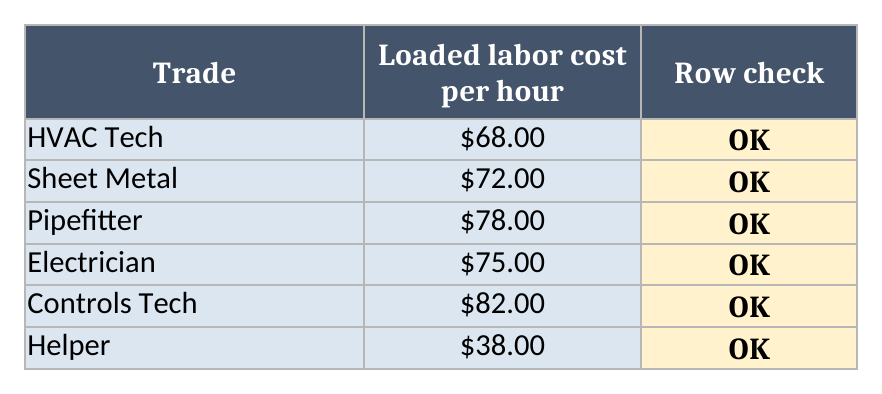
- Rates lists each trade you bid with its loaded labor cost per hour, plus a Row check.
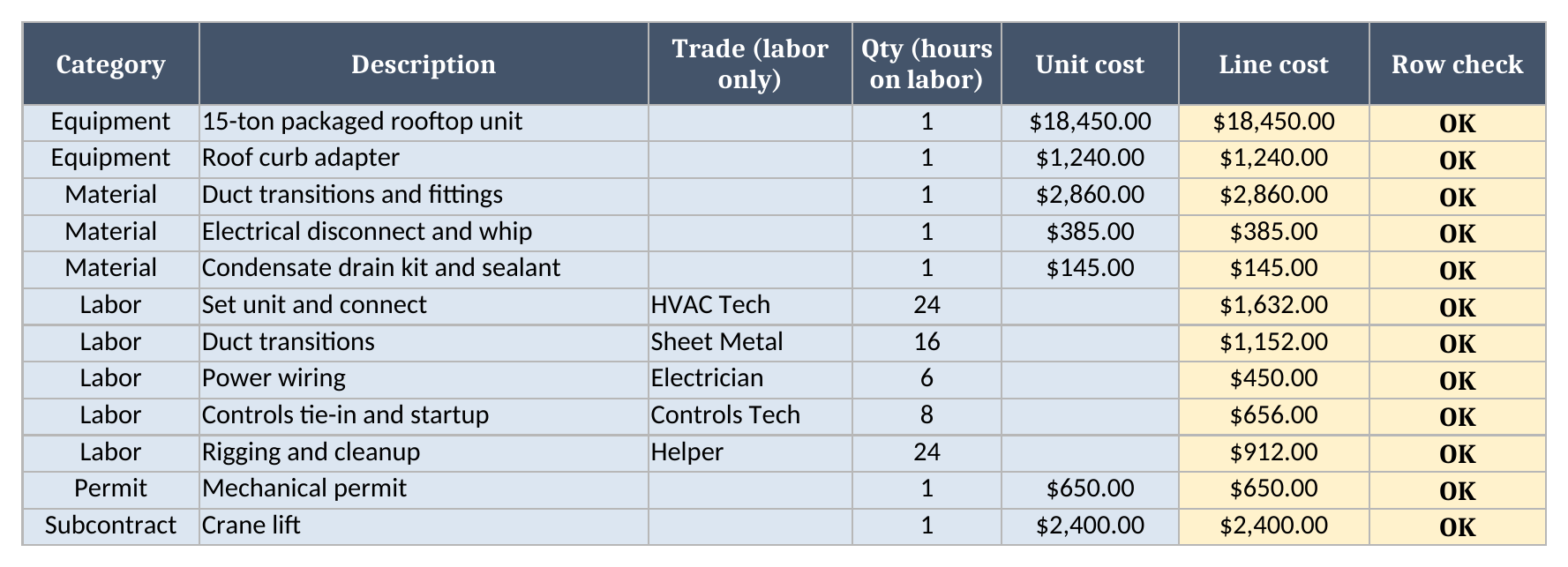
- Line Items has one row per cost line: category, description, trade (labor rows only), quantity or hours, unit cost, the calculated line cost and a Row check.
- Scope holds the written inclusions, exclusions and clarifications that go with the price.
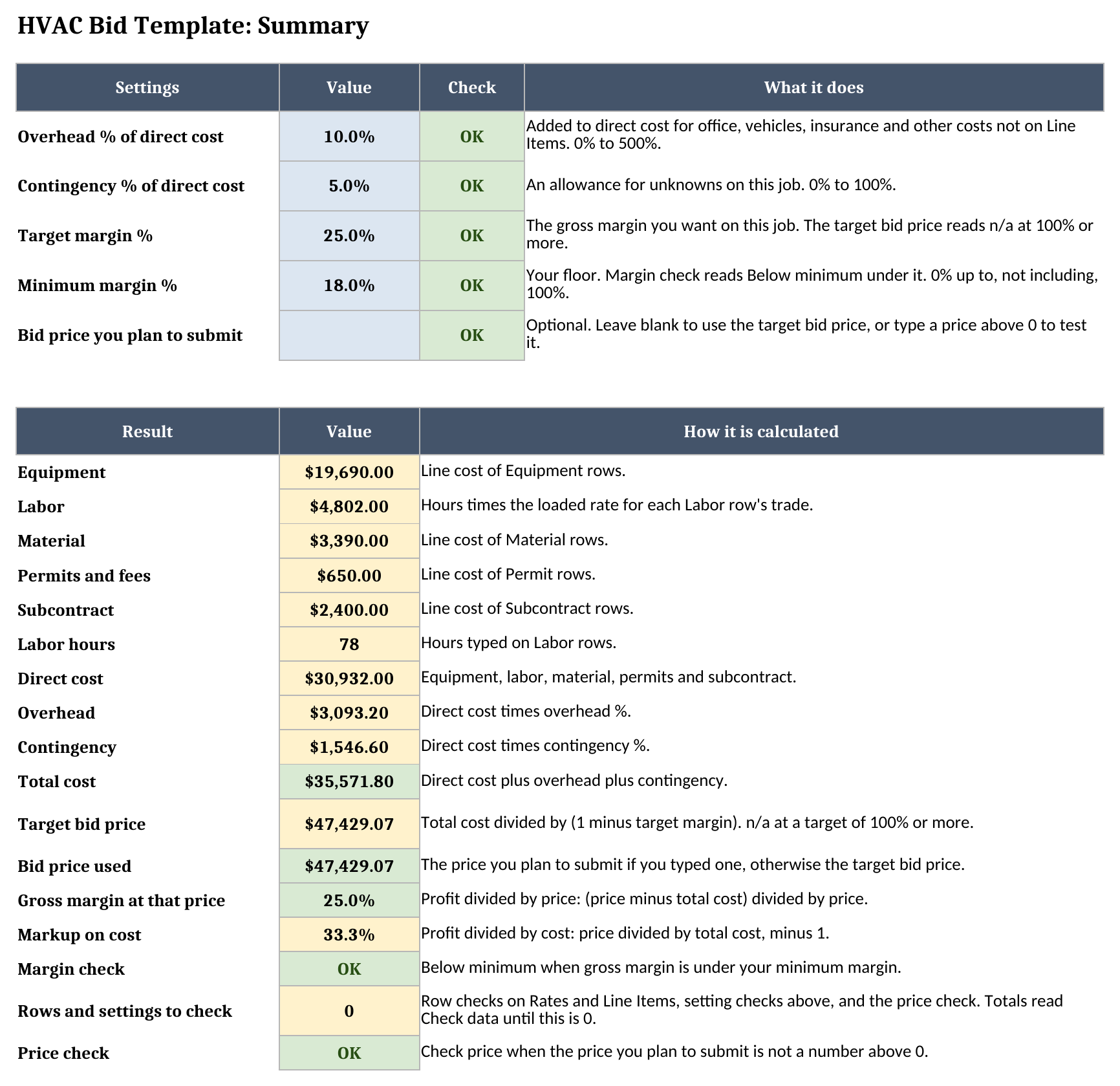
- Summary holds your overhead, contingency, target margin, minimum margin and an optional planned price. It works out direct cost, total cost, the target bid price, gross margin, markup and the margin check.
Blue cells are for typing, yellow cells calculate, and green cells hold the headline results.
How to set it up
- Open the file in your spreadsheet app. If it opens read-only, turn on editing so the formulas calculate.
- On Rates, enter each trade with its loaded cost per hour: your wage plus burden, meaning payroll taxes, workers’ comp, insurance and benefits. The sample rates are placeholders, not market rates, so don’t bid with them.
- On Line Items, clear the sample job and enter yours. Pick a category from the dropdown. Labor rows take a trade and hours; every other row takes a quantity and a unit cost.
- On Summary, set overhead and contingency as a percent of direct cost, then your target and minimum margin.
- Read the target bid price. If you already have a number in mind, type it in Bid price you plan to submit and check the margin.
- Write the scope on the Scope sheet.
- Fix any Row check that isn’t OK. Until Rows and settings to check reads 0, the totals and prices show Check data in place of a number.
Labor priced by trade
A single blended labor rate hides which trade the hours belong to. In this workbook a Labor row carries only a trade and hours, and the rate comes from Rates, so changing one trade’s cost reprices every line that uses it.
The sample job has five labor lines:
| Labor line | Trade | Hours | Loaded rate | Line cost |
|---|---|---|---|---|
| Set unit and connect | HVAC Tech | 24 | $68 | $1,632.00 |
| Duct transitions | Sheet Metal | 16 | $72 | $1,152.00 |
| Power wiring | Electrician | 6 | $75 | $450.00 |
| Controls tie-in and startup | Controls Tech | 8 | $82 | $656.00 |
| Rigging and cleanup | Helper | 24 | $38 | $912.00 |
That comes to 78 hours and $4,802.00 of labor. The trade on a Labor row has to match exactly one Rates row. If it’s blank, missing from Rates or listed there twice, the row shows Check ID and gets no cost, so a typo shows up as a flag and never as a line priced at zero.
The Equipment lines pair with our HVAC equipment schedule template. The schedule documents the unit you’re quoting, and its model and capacity can go straight into the line description here.
From total cost to bid price
Summary builds the price in three steps. Direct cost is the sum of every line: equipment, labor, material, permits and subcontract. Overhead and contingency are then added as percentages of direct cost, which gives total cost. Finally, the target bid price is total cost divided by one minus your target margin.
The division is where markup and margin part ways. Adding 25.0% to cost leaves less than 25.0% of the price as margin. To keep 25.0% of the price, the sheet divides by one minus the margin, which works out to a 33.3% markup on cost. Summary shows margin and markup side by side on every bid.
The margin check on a lower price
Before a bid goes out, someone usually asks whether it could come in lower. Type that number in Bid price you plan to submit and Summary reprices around it: Bid price used switches to your number, and gross margin, markup and the margin check follow.
On the sample job, a price of $44,000 still clears the 18.0% minimum, at a 19.2% gross margin and a 23.7% markup. At $42,000 the margin falls to 15.3% and the margin check reads Below minimum. Clear the cell and the sheet goes back to the target price.
The planned price has to be a number above zero. A negative number, a zero or a word in place of a number reads Check price, and the totals switch to Check data until you fix it.
Worked example: a 15-ton rooftop unit replacement
The sample is a made-up commercial job. The old packaged rooftop unit comes out, a new 15-ton unit goes on the existing curb with an adapter, the crew connects ductwork, power and controls, and a crane does the lift. Here’s what Summary shows:
| Summary line | Result |
|---|---|
| Equipment | $19,690.00 |
| Labor | $4,802.00 |
| Material | $3,390.00 |
| Permits and fees | $650.00 |
| Subcontract | $2,400.00 |
| Direct cost | $30,932.00 |
| Overhead at 10.0% | $3,093.20 |
| Contingency at 5.0% | $1,546.60 |
| Total cost | $35,571.80 |
| Target bid price at 25.0% margin | $47,429.07 |
| Gross margin | 25.0% |
| Markup on cost | 33.3% |
The rooftop unit alone is $18,450.00, more than half the direct cost on this sample. Every figure here is a sample input for you to replace, and none of it is a benchmark for your market.
The scope sheet
The Scope sheet keeps the written terms next to the numbers, in three lists: what’s included, what’s excluded and any clarifications. The sample includes “Remove and dispose of existing unit”, excludes “Roof repairs beyond the curb”, and clarifies “Work performed during normal business hours”.
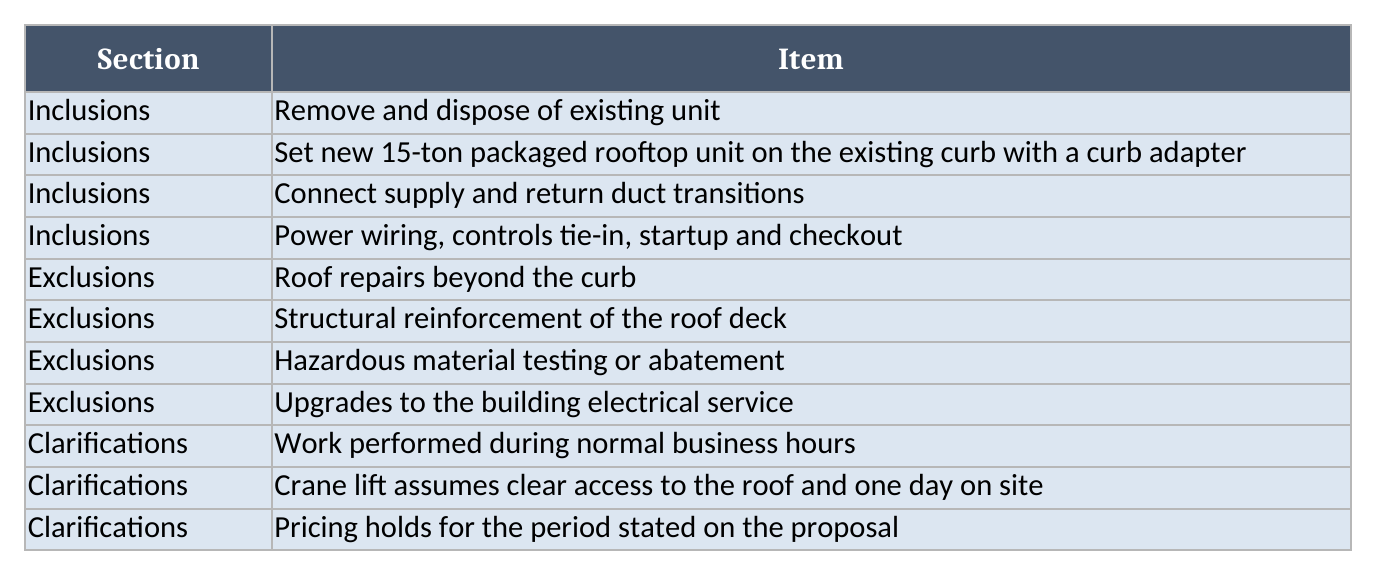
It’s plain text with no formulas. Copy it into your proposal or print it with the Summary.
Importing into Google Sheets
To bring the file into Google Sheets:
- Download the workbook from the bid template link.
- Open Google Sheets.
- Choose File > Import > Upload.
- Select the downloaded file.
- Choose Insert new sheet(s), or create a new spreadsheet from the upload.
- Check Line Items and Summary after the import.
There are no macros. Formulas, dropdowns and formatting may not carry over exactly, so compare the totals and row checks with the original file before you rely on the imported copy.
Limitations to know before relying on it
- Margin here is gross margin on this one job: price minus total cost, divided by price. It isn’t a company profit figure.
- Overhead and contingency are flat percentages of direct cost. If you recover overhead per labor hour, build it into the loaded rate and set overhead lower.
- Each trade has one loaded rate. Overtime or shift premiums need their own trade row, such as “HVAC Tech OT”.
- Sales tax on materials or on the price isn’t calculated.
- The workbook holds up to 50 trades and 200 line items. Formulas, totals and dropdowns stop at row 51 on Rates and row 201 on Line Items.
- It’s one file for one job. It won’t turn an accepted bid into a job, a purchase order or an invoice.
When several estimators bid at once, or accepted bids need to flow into scheduling and invoicing without retyping, compare the options in our roundup of the best estimating software for field service. More free workbooks are on the field service templates page.
Until then, grab the HVAC bid template, enter your next job, and see what margin your price carries.